
Yes, you can customize your Shopify theme with Claude without knowing how to code. The key is a single rule: the AI always works on a private copy of your theme, never on the store your customers see. That way you review every change on your phone before publishing it, and undo it if you don't like it.
I'm telling it from what I do in my own stores, which run on free Shopify themes (Fabric and Refresh).
What Claude can do with your Shopify theme#
A Shopify theme is code files (Liquid, CSS and JavaScript). Claude can read, understand and change them just like a developer:
- New sections: a bundle picker, a comparison table, a size guide or an FAQ block.
- Change what you have: a buy button that doesn't disappear on mobile, another font or a different menu.
- Fix what's broken: leftover code from apps you uninstalled, or cart errors.
- Remove paid apps that only display things in the store: free shipping bars, badges or tabs.
What it must not do: touch the published theme, edit the theme's original files (it breaks updates), or replace apps that handle customer data or payments.
Before you start: what you need#
| You need | Why |
|---|---|
| The Claude desktop app with a paid plan | It's the one that can work with files on your computer |
| Owner or staff access to your Shopify store | To download the theme and upload the copy |
| A theme from 2021 or later (Dawn, Horizon, Fabric, Refresh…) | «Online Store 2.0» themes can be extended with sections |
| A reference of what you want | A screenshot, a Pinterest pin or a link |
Step by step: customizing your theme with Claude#
1. Duplicate the theme#
In Shopify go to Online Store → Themes → … → Duplicate. That copy is where you'll work; your live store is untouched.
2. Give Claude the reference, not technical instructions#
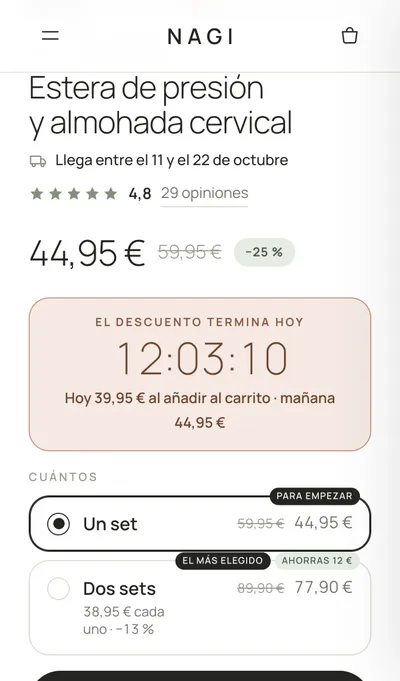
Write what you want as you'd tell a person: «I want my product page to sell bundles like this one I saved», and paste the screenshot. Ask for two versions in your colours before building anything: changing a design is much cheaper than changing code.
3. Have it build on the copy and check it on mobile#
With the chosen design, Claude writes the code as new blocks or sections, without editing the original files, and uploads it to the private copy. Open it with Shopify's preview on your phone and on your computer.
4. Review and publish yourself#
If you like it, publish it from Shopify. If not, ask for changes or discard the copy. Publishing should always be your click.
The 4 mistakes that break stores when using AI#
- Pasting ChatGPT code straight into the published theme. If it fails, your customers see it.
- Editing the theme's original files. The next theme update wipes the change or clashes with it.
- Not checking on mobile. Most sales come from there, and it's where layouts break most.
- Removing an app without knowing what it does. Some leave code in the theme and others manage data you can't recreate.
How long it takes (real data)#
In one of my stores, on the free Refresh theme, I timed the whole flow: 17 seconds to connect the environment to the store, 22 seconds to send a change to a private preview and 0 changes to the published theme throughout testing.
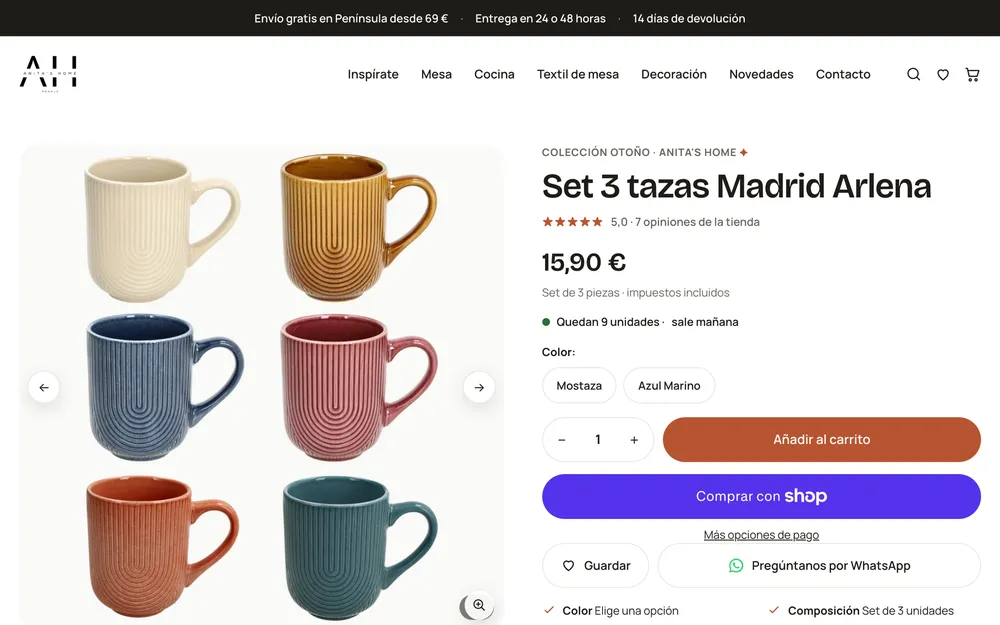
In another, on Fabric, 31 store parts were designed and built (header, cart, product page, collections, search, 404) and 50,427 internal links were checked before launch, with 0 broken. See the Anita's Home case.
Doing it yourself or with Workshop#
Everything above can be done by hand with Claude if you keep the rules yourself. Workshop is a folder you open in the Claude app (or in ChatGPT) that comes with those rules built in: locks so it can't publish or touch your live store, changes that don't touch the original files, mobile and desktop checks, and /undo to reverse any change. If you'd rather have us do it, see custom Shopify stores.
Frequently asked questions
Can I customize the Shopify Dawn theme with AI?
Yes. Dawn and every free Shopify theme from 2021 onwards support new sections and blocks, which is how AI should add changes without touching the original files.
Can Claude break my Shopify store?
Only if you let it work on the published theme. If it works on a duplicated copy and you publish, your live store does not change until you decide.
Do I need Claude Code or is the Claude chat enough?
To change theme code safely, Claude has to work with the files: the Claude desktop app with a paid plan. Pasting code from the chat works for small things, but without a copy, checks or history.
Can I remove Shopify apps with this?
The ones that only display things in your store (badges, free shipping bar, FAQ, size charts, sticky button), yes. Verified reviews, subscriptions, email or shipping apps are better kept.
Does it work with paid themes?
Yes, with Theme Store themes. What AI must not do is copy code from one paid theme to another: they are licensed per store.